


Often the task of training new employees or fielding questions about new software falls on the IT department. Though most IT staff is up to the task, it can take time away from their other daily job details. Plus, creating a training guide can take up even more precious office time.
To help make this task less time-consuming, our IT Downloads area features a new Microsoft Excel 2013 Cheat Sheet. You can download this full-color PDF and have a ready-made guide for your Excel users to keep at their desks for reference. Put it up on the projector and use it as a simple presentation sheet for Microsoft Excel 2013 training sessions. Include it in an email to new employees to review and get up to speed with Excel usage.
The PDF includes general commands for simple functions. It also has several panes labeled for General, Navigation, Editing and Formatting commands, which makes it easy for users to find what they need at-a-glance.
Another section provides a list of fundamental information that users of Excel 2013 should know, such as how to Create a New Workbook, Select a Cell Range or Change Views. Further panels included in the PDF show a more extensive selection of Editing functions, Formatting, Formulas and Functions, Workbook Management and Charts.
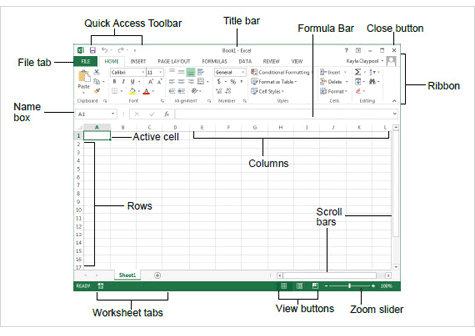
The PDF also includes a diagram of a Workbook page. The features are labeled so that even the most novice user can follow along with a training lesson or review the guide if they have questions about a specific area of the program.
This PDF guide is provided to IT Business Edge by CustomGuide Interactive Training. The company provides courses and training on a variety of Microsoft software including Excel, Access, Project, Sharepoint and Word.
This PDF guide would be useful for IT managers to send out to their support staff, for trainers to send to end users, or for anyone to provide to new employees who’ve just started a job that requires Excel usage.
Kim Mays has been editing and writing about IT since 1999. She currently tackles the topics of small to midsize business technology and introducing new tools for IT. Follow Kim on Google+ at google.com/+KimberlyMays6 or Twitter @blumoonky.