


The threat landscape is constantly changing as attackers create and deploy new threats. It’s easy for businesses to fall victim to new cybersecurity attacks if they aren’t keeping up to date with new malware and scam tactics. Luckily, threat intelligence software provides information on new threats and system vulnerabilities as it relates to networks, endpoints, and infrastructure.
What is Threat Intelligence?
Threat intelligence is a type of data that organizations collect that tells them what an attacker’s motives, behaviors, and targets typically look like. It reports on known malware signatures, the types of data ransomware groups like to target, and possible symptoms of an infection on a company’s device or network.
Using this information, businesses can make more informed security decisions and focus on the areas of their network that are the most at-risk. Because organizations can use threat intelligence to protect themselves against both known and unknown threats, they can take a more proactive approach to cybersecurity, preventing breaches rather than trying to mitigate the damage afterward. The information provided helps them create better incident response plans and provide more focused training to their employees.
Also read: Emerging Cybersecurity Trends in 2022 and Beyond
Types of Threat Intelligence
There are four types of threat intelligence that organizations need for an effective cybersecurity defense.
- Strategic: offers high-level information on threats and is usually meant for a non-technical audience, typically at the executive level. It gives the user an idea of what the possible ramifications of a breach could be to better inform their decision-making.
- Tactical: provides specific details regarding an attacker’s methodologies, targets, and the tools they use. This information typically goes to technical users, like security experts, and tells them what indicators of compromise (IoCs) they should look for.
- Technical: gives both technical and non-technical employees signs to look for that indicate a specific type of threat, including key phrases in email subject lines. This type of intelligence changes often to account for changing attacker tactics.
- Operational: relies on gaining intelligence about a specific incoming attack, typically through social media and chat rooms. It can provide more insight to where and when an attacker will hit, which assets are vulnerable, and how an organization can stop the breach before it happens.
What is a Threat Intelligence Platform?
A threat intelligence platform is a type of software that collects this threat data from multiple sources and organizes it, so companies can see what their biggest security risks are. Security professionals can use a threat intelligence platform to handle the collection and organization of threat data, allowing them to focus on analysis and preparation. The security team can also share reports that the threat intelligence software generates to help them get executives on board for new security measures.
Key Features of Threat Intelligence Software
Threat intelligence software should make it easy for security teams to identify potential threats and protect their systems against them. Here are the features organizations looking for a threat intelligence platform should prioritize.
Integrations
Threat intelligence software should integrate with an organization’s other security tools, including security information and event management (SIEM), endpoint protection, and firewalls. These integrations allow the security team to gather threat intelligence in the applications they already use to protect the business, rather than having to visit a separate console to learn more about a potential threat.
Central Management Console
Thanks to the integrations that threat intelligence software should include, it provides a single management console for the security team to identify and remediate threats. With a single management dashboard, security experts can match up anomalies with known threats and speed up the remediation process.
Multiple Data Sources
Threat intelligence software should be able to pull threat data from multiple sources in order to create a complete picture of a potential attack. Not every source is going to have all the information security professionals need to protect their organization, but one may be able to provide the methods of the attacker, while others could speak to their preferred targets or specific tools they use.
Top Threat Intelligence Platforms & Tools
Businesses looking to add threat intelligence software to their current cybersecurity stack should consider the following platforms, chosen for their cybersecurity expertise, user reviews, and feature options.
Cisco Secure Malware Analytics
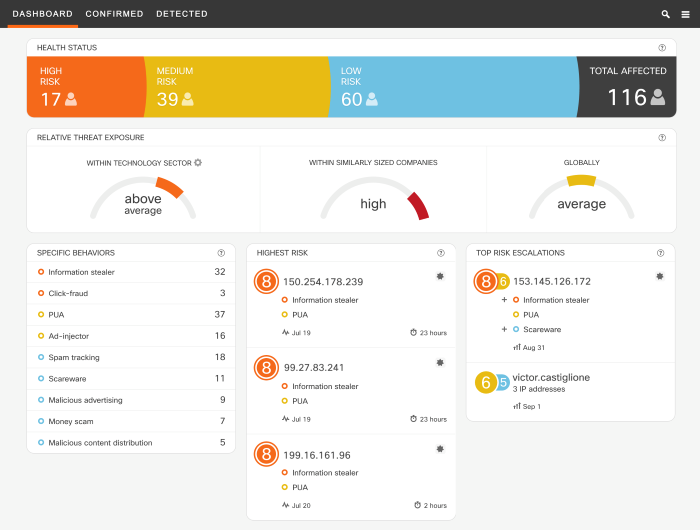
Cisco Secure Malware Analytics (formerly Threat Grid) combines threat intelligence with advanced sandboxing, allowing security teams to get a better understanding of what malware is trying to do before they remove it from the system. With both a global and historical view of the malware, users can identify how the threat has changed over time and make educated guesses of what it might look like in the future. Additionally, threat prioritization helps the security team respond to the most pressing issues first and prevents them from wasting time on false positives when a real threat is in the works.
Key Features
- Behavioral analytics
- API integrations
- Sandboxing
- Correlation analysis
- Threat prioritization
- Context-rich analytics
Pros
- Up-to-date knowledge base of malware and behavioral indicators
- Real-time identification of attack type
- On-premises, cloud, and hybrid deployment options
Cons
- Expensive licenses
- Patches and updates require users to restart the system
SIRP
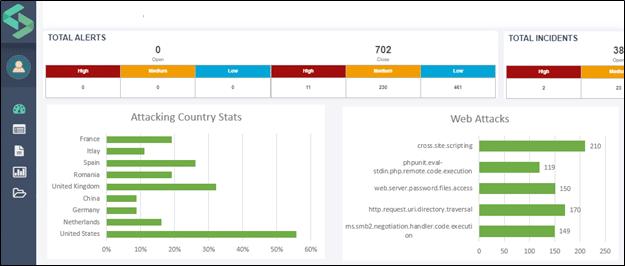
SIRP collects cybersecurity data from all of your different platforms and organizes it all in one place. The data is then placed into separate containers depending on its type. Incidents, threat intelligence, and vulnerabilities are all placed into their own buckets, so it’s easy for security teams to find the information they need. Threat scores tell the IT team which issues they should tackle first, while automating parts of the remediation processes reduce IT’s manual workload. SIRP also encourages team collaboration with shared workflow and case management functionalities.
Key Features
- Various threat feed formats (RSS, STIX, web, email, and TAXII)
- Threat prioritization
- Contextual threat data
- Real-time threat intelligence
- Customizable alerting
- Automated analysis
Pros
- Helpful and responsive customer support
- Automation reduces IT operating costs
- Organizations can choose the features they need
Cons
- Some integrations and customizations require help from the support team
- Steep learning curve for beginners
Palo Alto Networks Autofocus
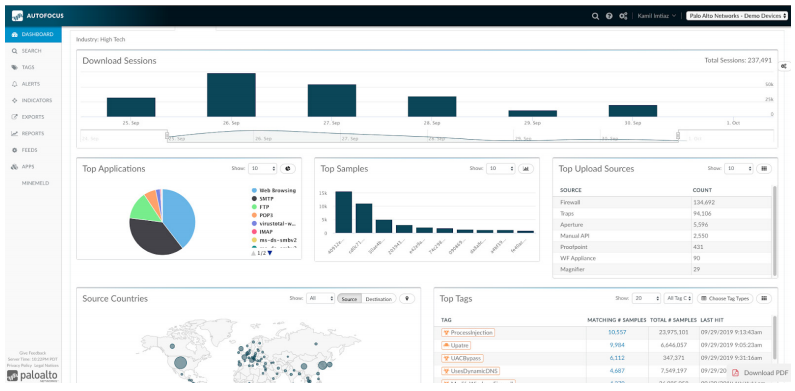
Autofocus from Palo Alto Networks contains intel on millions of vulnerabilities to prepare IT teams for potential threats. This threat intelligence is enriched further with context from Unit 42, a recognized authority on cyberthreats. The robust search features make it easy to research and analyze threats, allowing an organization’s security team to search billions of samples and trillions of artifacts. Users can customize dashboards, reports, and alerts. While some platforms combine threat intelligence and other cybersecurity tools, Autofocus is solely dedicated to threat intelligence and helping IT teams prevent attacks.
Key Features
- Contextual analysis
- Granular search function
- Native and API integrations
- Customizable dashboard and reports
- Analysis of over 14 billion malware samples
- In-depth playbooks
Pros
- Detailed, customizable dashboards
- Complete threat visibility
- Advanced network breakdowns
Cons
- Can be difficult to track false positives
- Price is slightly high compared to similar tools
Also read: Palo Alto Networks Unveils Okyo Garde Cybersecurity Solution
CrowdStrike Falcon
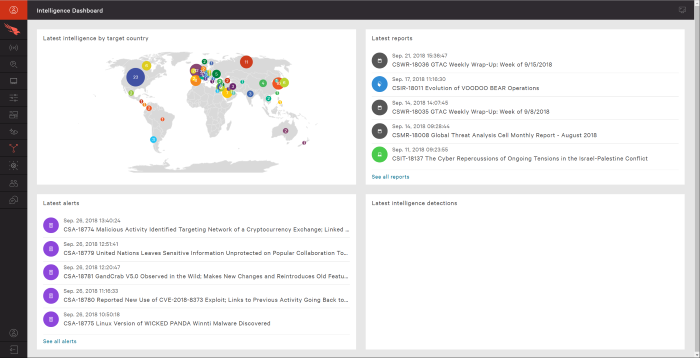
CrowdStrike Falcon is an endpoint protection program that combines antivirus, threat intelligence, device control, and firewall control in even the most basic package. It is a cloud-based, modular platform that allows customers to build an endpoint security system that meets their needs. Modules can either be purchased alone or as part of a larger bundle. The threat intelligence tool combines automated analysis with human intelligence, so security teams can stay ahead of attackers by predicting their next move. The basic level automatically investigates incidents and initiates response protocols.
Key Features
- Native and API integrations
- Automated investigations from CrowdStrike
- Daily intelligence reports
- Sandboxing
- Attacker profiles
- Dedicated CrowdStrike analyst
Pros
- Fast detection engine
- Detailed threat database
- Thorough breakdown of incidents
Cons
- Price is per endpoint, which could be prohibitive for some businesses
- Not all machine types are supported
Also read: EDR vs EPP? You Really Need Both
IBM X-Force Exchange
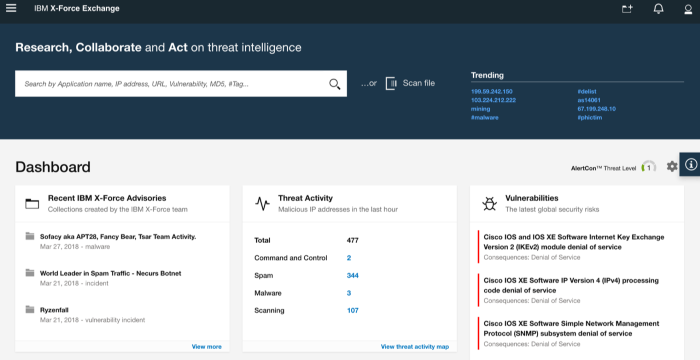
IBM X-Force Exchange not only provides threat intelligence from industry experts, but it also allows users to collaborate with peers to get the best information from a variety of sources. The cloud-based system provides security research assets to help IT teams better understand emerging threats and security risks, analyze threats, and make decisions in near real time. With both human and machine-generated intelligence, cybersecurity teams get the best intel to protect against attacks. There are several packages available, so businesses can get the level of security they need.
Key Features
- Native and API integrations
- Robust search function
- ISO Compliance
- Early warning feeds
- Unlimited number of records
- Indicators of compromise
Pros
- Free plan for basic use
- Simple user interface
- Access to a large amount of threat intelligence data
Cons
- Intel can be very general and not detailed enough to be actionable
- AI capabilities are not as robust as some customers would like
Also read: IBM X-Force: Threat Intelligence Product Overview and Insight
N-Able Risk Intelligence Software
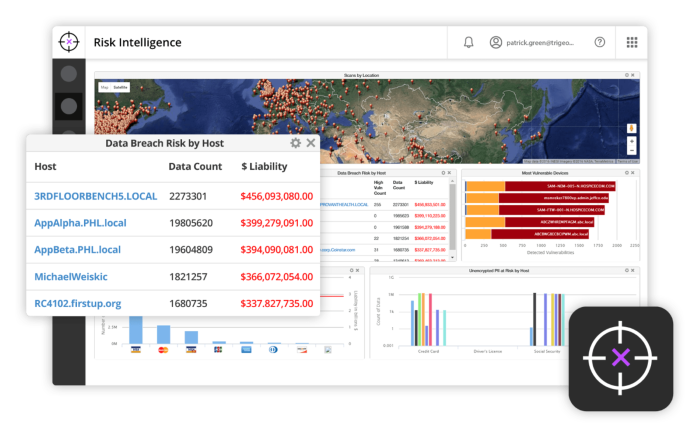
N-Able Risk Intelligence Software (formerly SolarWinds MSP) is mainly geared towards managed service providers (MSPs) to help them assess their clients’ networks. The system assigns values to data vulnerabilities to show how likely a breach is and how much it could cost a company. It also prioritizes vulnerabilities, so users know where to start fortifying a network. The permissions discovery feature ensures that only authorized users can access sensitive information, and vulnerability scanning identifies the holes in the network and the best ways to patch them.
Key Features
- Vulnerability scanning
- Brandable reports (great for MSPs)
- Trending risk reports
- Identity and access management
- PCI, DSS, PAN, and PII scans
- Configurable scan policies
Pros
- Gives a clear view of breach risks
- Applies standard monetary figures to unprotected data to estimate what a breach could cost
- Backup and recovery options provide protection against ransomware
Cons
- The system sometimes has problems with certain hardware and software combinations
- Occasionally times out on large networks and has to restart
ThreatConnect
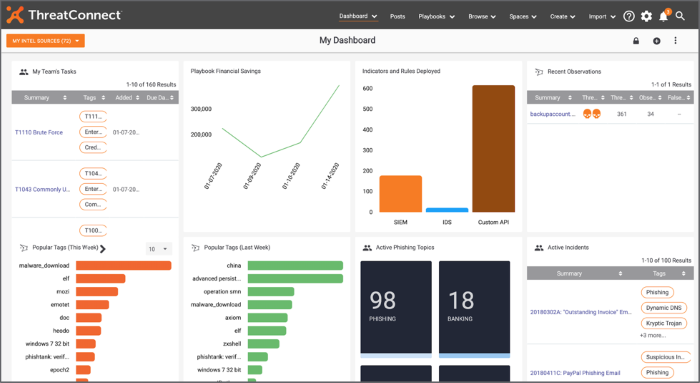
ThreatConnect unites threat intelligence, security orchestration and response, and cyber risk quantification all in one platform. The system aligns security protocols to the business, rather than taking a one-size-fits-all approach. It streamlines processes and breaks down obstacles between teams to optimize cybersecurity, using risk reduction as a way to measure the security team’s efforts. The system provides a detailed view into threats for quicker assessments and streamlined processes and aligns strategic and operational goals to help security teams prioritize the most important vulnerabilities.
Key Features
- Native and API integrations
- Shareable threat intelligence reports
- Dynamic, intelligence-driven playbooks
- Threat scoring
- Actionable threat insights
- Automated playbook adjustments
Pros
- Advanced features and API make security teams more efficient
- Helpful and responsive customer service team
- Easy to keep incidents and indicators organized
Cons
- User interface isn’t very simplified and sometimes takes multiple clicks to get somewhere
- Some glitches that freeze the system and require restart
Choosing the Best Threat Intelligence Tool for Your Business
Each business will need something different from their threat intelligence platform, whether that’s sandboxing so they can further analyze attacks or behavioral analysis to quickly identify threats. When choosing the right threat intelligence software for your business, it’s important to decide whether you’re only looking for threat intelligence, or you’d like a platform with other offerings, like antivirus or endpoint protection.
Enterprise businesses with in-house security teams should consider best-of-breed standalone software, while small and medium-sized businesses may prefer threat intelligence as part of another security tool.
Read next:Top Five Vulnerabilities Attackers Use Against Browsers