


Many organizations have made a business case for using SharePoint as a collaboration tool for their users. Through the SharePoint site, business users can connect with other users in the enterprise to share files and learn about other departments and workers via social feeds and communities. The most recent version, SharePoint 2013, has been around for over a year, but users new and seasoned still may not readily remember all the tricks, bells and whistles the program provides.
That’s why CustomGuide has created an easy-to-use Microsoft SharePoint 2013 Cheat Sheet that is available for free in our IT Downloads area. IT trainers, support staff and managers can all use this sheet in new-user presentations and then pass the document on to business users to help them find SharePoint information at-a-glance.
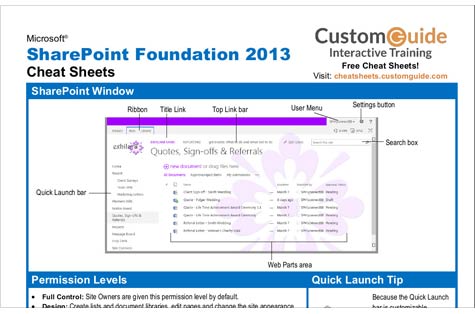
The cheat sheet shows the SharePoint window with labels indicating the main features including the Quick Launch bar, Search box, and Ribbon. Other sections are:
- Permission Levels
- Quick Launch Tip
- Fundamentals
- Documents
- Wikis
- Blogs
- Lists
- Surveys & Discussions
Each of these sections is blocked out and includes a bulleted list of tips that users can quickly and easily read through. For example, when a user wants to edit a document that has been shared with another user, he or she can find a quick tip under Documents that explains exactly how to open and edit shared files. Under Blogs, a user could find out how to set up an RSS feed by which he or she can read updates.
Under Fundamentals, users will find information on navigating through the SharePoint site and the usage of Permission Levels, along with how to change views, search for data and change settings.
The cheat sheet includes basic and detailed commands and tips for users of all levels. Though it is not an exhaustive guide, it will help business users become comfortable with using SharePoint 2013 without having to call support staff with questions. After all, having information on hand will help users feel more secure in using SharePoint, which will in turn promote further collaboration with other business users.
Kim Mays has been editing and writing about IT since 1999. She currently tackles the topics of small to midsize business technology and introducing new tools for IT. Follow Kim on Google+ or Twitter.